
AI Copilot is a built-in artificial intelligence assistant inside ClinicSoftware.com that gives you a live, conversational overview of everything happening in your business — bookings, payments, quotes, balances, clinic notes and client activity — without having to dig through multiple reports or pages.
AI Copilot is available from every page of the platform (Calendar, Contracts, Leads, Deals, Tasks, Memberships, Automation, Marketing, Quotes, Misc, Files, etc.) — simply click the AI Copilot icon in the top right corner of the screen, and the panel opens on the right-hand side on top of whatever page you're currently working on, so you never lose your place.
1. Live daily activity dashboard
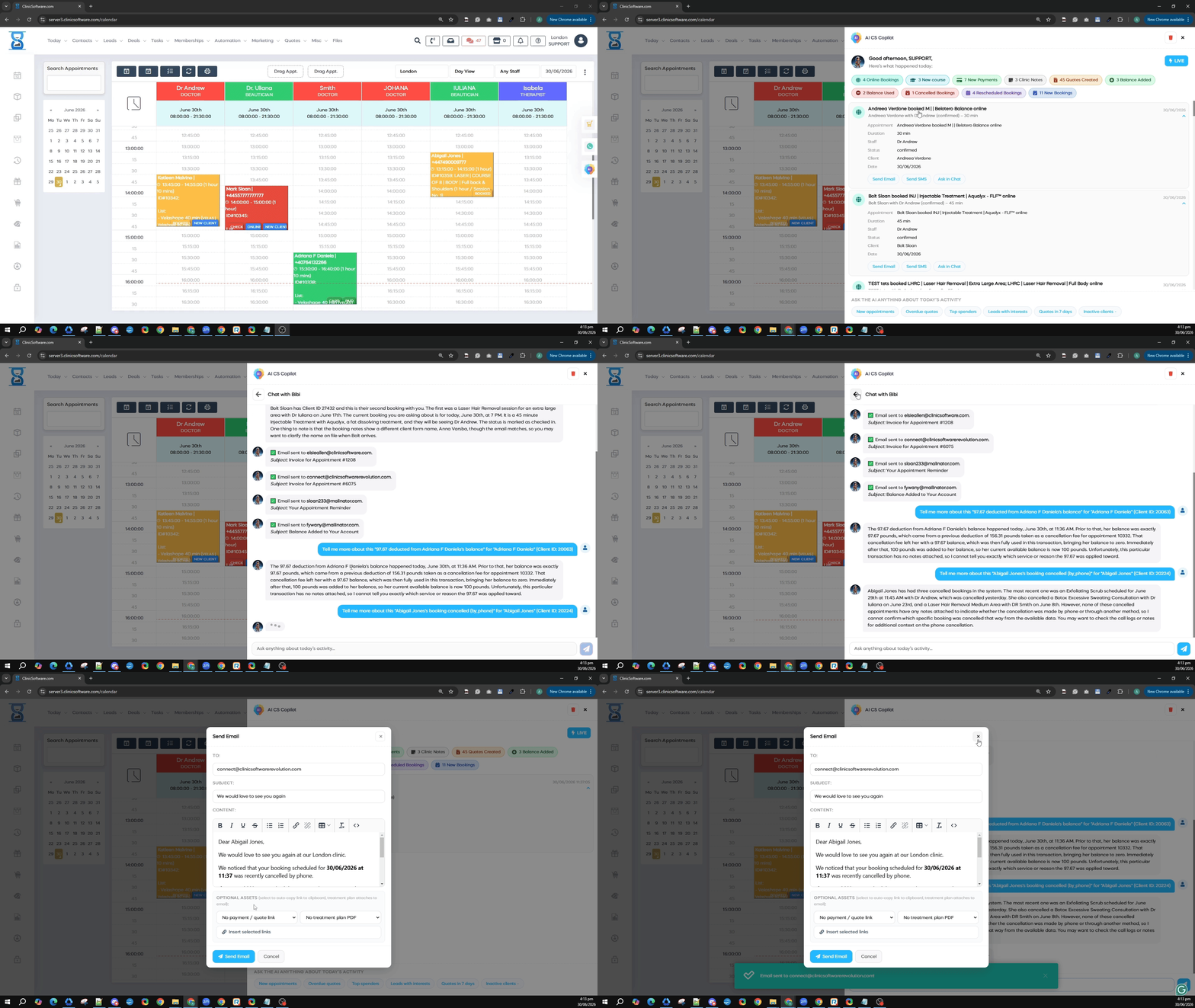
As soon as you open AI Copilot, it presents a real-time summary of "What's happened today", broken down into clickable category tags, such as:
- Online Bookings — appointments booked through your online booking page
- New Course — new treatment courses purchased
- New Payments — payments received today
- Clinic Notes — clinic notes added by your staff
- Quotes Created — new quotes generated
- Balance Used / Balance Added — client balance/account credit activity
- Cancelled Bookings and Rescheduled Bookings
- New Bookings — total appointments booked today, regardless of source
Each tag is clickable and expands into a detailed, chronological feed of every event in that category, showing client name, amount, time and a short description. A "LIVE" indicator confirms the data updates in real time.


2. Drilling into individual events
Every entry in the activity feed (a payment, a balance top-up, a booking) can be expanded to show full details:
- Client name and ID
- Amount paid / balance before and after
- Payment method (cash, card, etc.)
- Date and time
- A short, auto-generated description (e.g. "Balance top-up")
From within the expanded entry, you get one-click action buttons: Send Email, Send SMS, and Ask in Chat (instantly pulls that specific record into the chat so you can ask follow-up questions about it).
3. Conversational chat
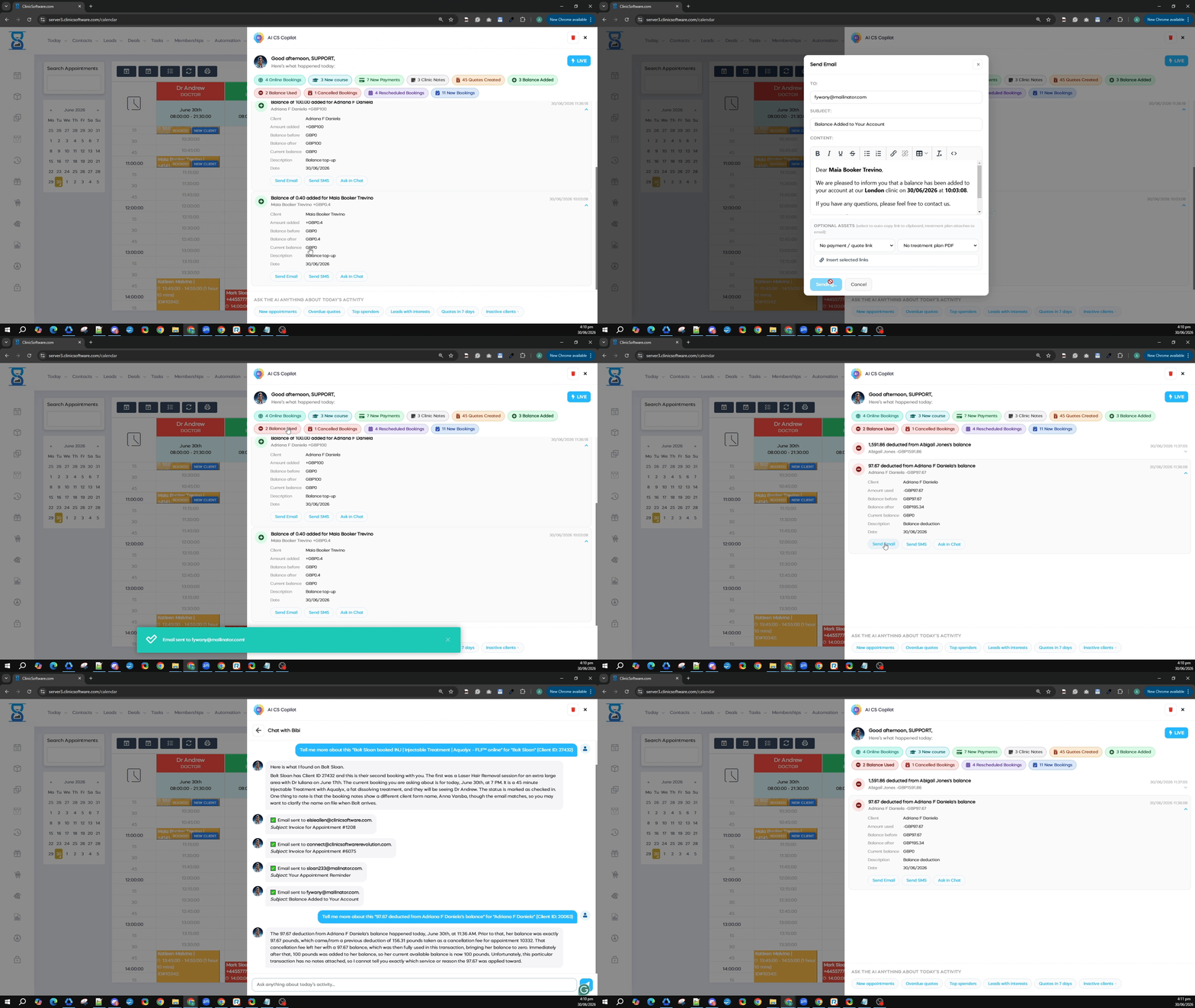
Besides the activity dashboard, you can switch to free-text chat and ask natural-language questions about your business and clients, for example:
- "Tell me more about this booking for [Client Name]" — the AI looks up the client's booking history, current appointment details, treatment type, assigned staff member, and even flags inconsistencies (for example, if the name on the booking form doesn't match the client record, even though the email matches).
- "Who are my top 5% spenders?" — returns a ranked list of your highest-value clients over the last 12 months, with combined and average spend per client.
- "Give me a short live briefing on today's activity" — generates a natural-language summary of the day (appointments booked, payments received with amounts and times, notable bookings, etc.).
While processing a request, a typing indicator is shown, and answers appear as chat bubbles, with a text input field at the bottom of the panel ("Ask anything about today's activity...").


4. Sending emails directly from the panel
AI Copilot can compose and send emails on your behalf without leaving the chat. For example, after looking up an appointment, it can automatically send an "Appointment Reminder" email to the client, confirming this in the chat with a message such as: "Email sent to [client email]. Subject: Your Appointment Reminder."
You can also open the full email composer (To, Subject, Content with rich-text formatting, plus the option to attach a payment link or treatment plan PDF) directly from the panel, edit the message, and send it — a green confirmation banner appears once it's delivered.

5. Overdue quotes & payment follow-ups
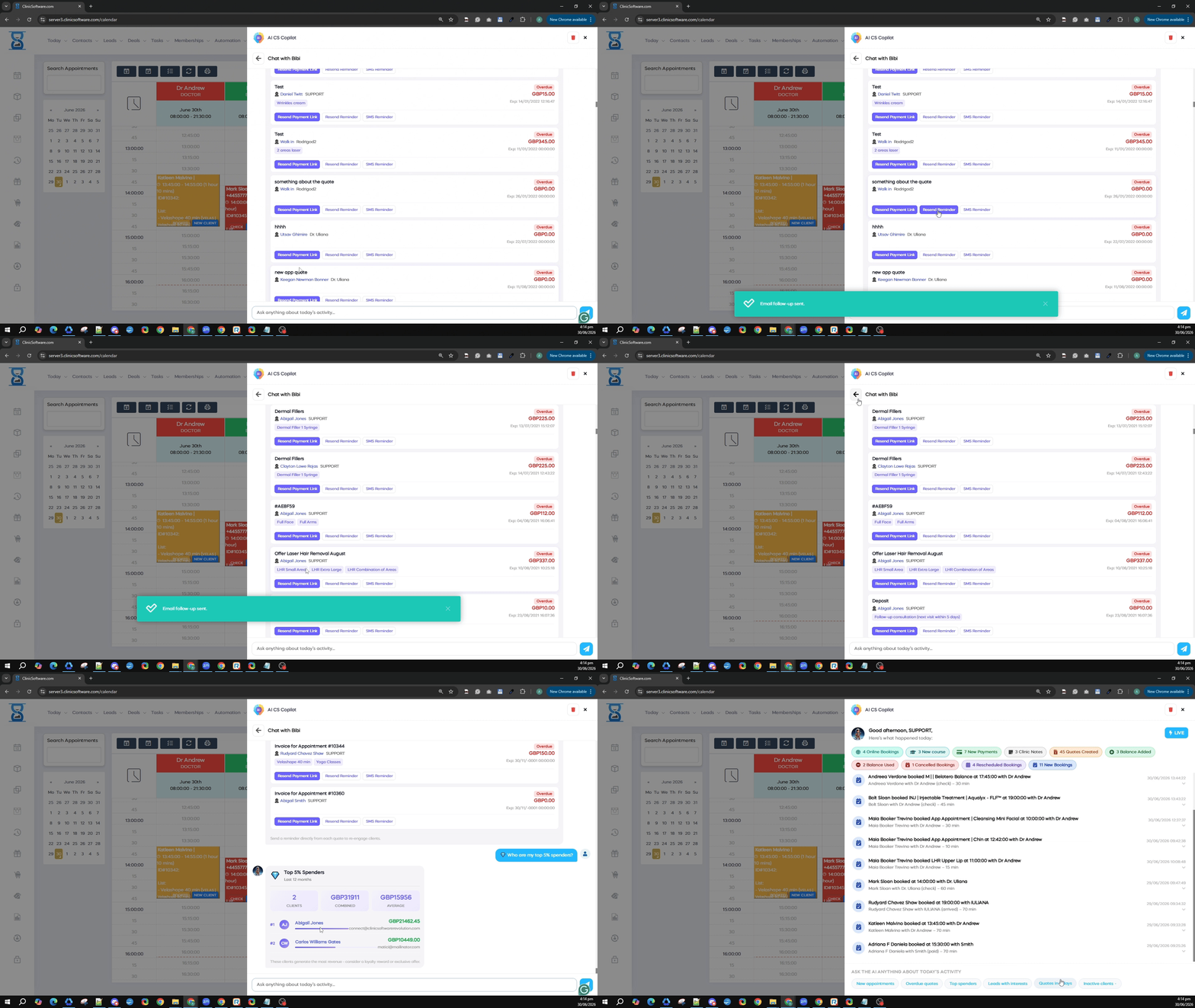
This section lists outstanding quotes with client name, assigned staff member, amount due and expiry date. For each overdue or upcoming quote you get quick-action buttons: Resend Payment Link, Resend Reminder, and SMS Reminder — letting front-desk and support staff chase outstanding payments in a couple of clicks.
6. Today's appointments & payment links
The panel also surfaces today's full appointment list (service, client, practitioner, time and status — booked / checked / paid), each with one-click buttons to Send Payment Link, Email Reminder, or SMS Reminder, with an on-screen confirmation toast once the message is sent.

7. Quick-access question shortcuts
At the bottom of the dashboard view, AI Copilot offers ready-made shortcut buttons to jump straight into common questions: New appointments, Overdue quotes, Top spenders, Leads with interests, Quotes in 7 days, and Inactive clients — letting your team get answers instantly without typing out a full question.

How this helps your business
- Saves time — staff no longer need to open multiple reports (payments, bookings, quotes, balances) separately; everything is summarised in one live panel, accessible from any page.
- Faster client follow-up — reminders, payment links and emails can be sent in one click directly from the relevant record, improving cash collection and reducing no-shows.
- Better client insight — staff can instantly ask about a client's history, current balance, or booking details instead of searching through the CRM manually.
- Revenue visibility — identifying top spenders and overdue quotes helps prioritise outreach toward the clients and payments that matter most.
- Reduced training time — instead of learning where every report lives, staff can simply ask the AI in plain language.
- Real-time awareness, everywhere — since the panel is available on every page, managers and staff always have live visibility into the business without switching context.
AI Copilot is designed to act as a virtual front-desk assistant — combining reporting, client lookup and communication tools into a single conversational interface available throughout the platform, helping clinics, spas, salons and healthcare practices run more efficiently and respond to clients faster.